Artful Agenda - Plan in Style!
- 4.0
- Rating
- 500.00K
- Installs
- Free
- Price

 Analysis by App-foxy
I have always liked the idea of a paper planner, but I do not always like carrying one around. Artful Agenda takes that familiar planning style and moves it onto a phone, while keeping the visual character that makes a paper diary pleasant to use. After spending time with it, I see it less as a replacement for every productivity tool and more as a focused daily planning space for people who enjoy writing down intentions, appointments, and small details in one attractive place.
This is a free productivity app from Artful LLC, rated for Everyone and available for Android devices running Android 6.0 or later. It has passed the half-million-install mark and holds an average rating of 4.0 from roughly 4.8 thousand ratings, with about 2.3 thousand written reviews. Those figures suggest a reasonably established audience, although they also tell me that this is a specific kind of planner rather than an essential tool for every phone owner.
How the planner feels in everyday use
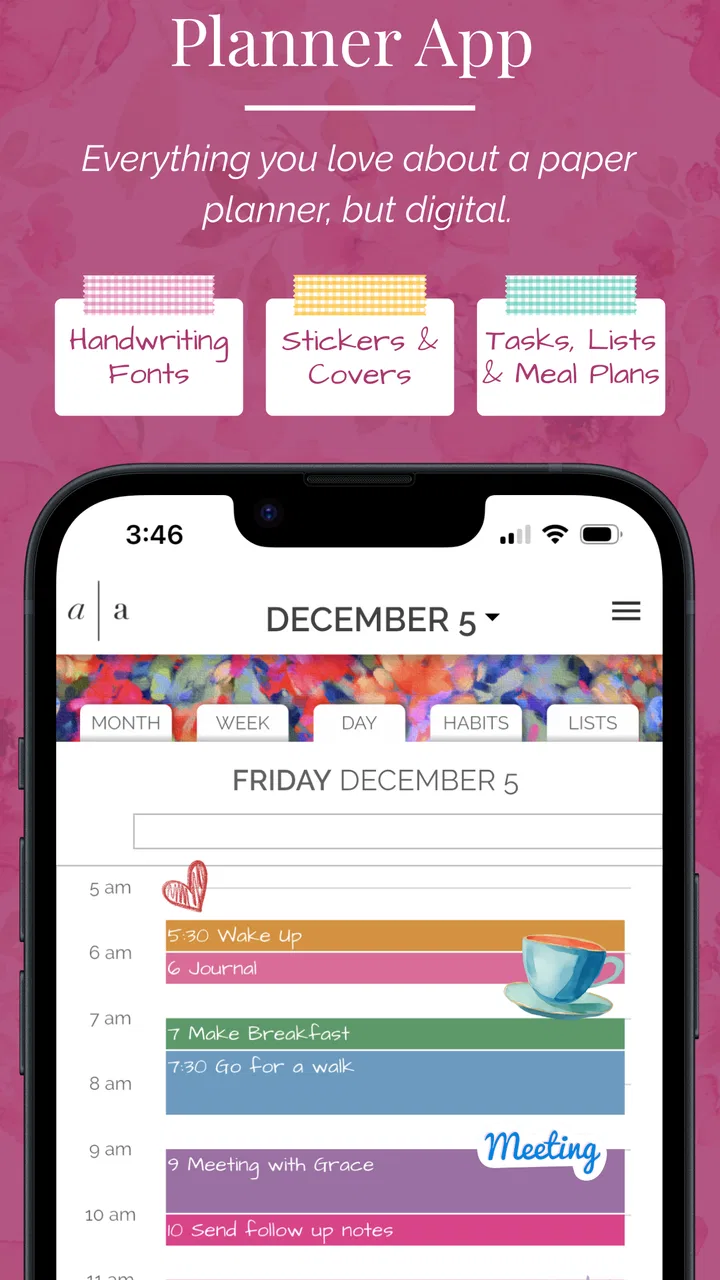
The first thing that stands out is the app’s attempt to preserve the rhythm of a physical planner. Instead of presenting productivity as a wall of tasks, it gives the day a more personal, page-like identity. That difference matters. I find it easier to return to a planner when it feels like a place I want to visit, not just another list demanding attention.
You May Also Like

 Blood Strike: 2.5 Anniversary
Blood Strike’s Loadouts Turn Every Drop Into a Tactical Gamble
A close look at Blood Strike’s custom loadouts: how fast access to signature weapons reshapes its battle royale rhythm, rewards preparation, and narrows the gap between fights.

 Pandora - Music & Podcasts
Pandora’s Music Is Easy to Start, but Harder to Recover
Pandora’s strength is its low-effort path from a seed to a station. Its weak spot is how much confidence it asks you to place in connection, setup, and quiet recovery.

 8 Ball Pool
 Is Built on Rivalries, Rematches, and Routine
A close look at the rivalries, rematches, shared routines, and unanswered safety questions that turn a quick pool match into a persistent mobile community.

 Samsung Music
’s Quiet Strength Is Playing What You Already Own
Its reach comes less from spectacle than from dependable access to a personal library. That simplicity is both the app’s strongest retention engine and its ceiling.

 AccuWeather: Weather Radar
AccuWeather Review: A Quick, Clear Forecast for Everyday Decisions
For everyday plans, the best forecast is the one you can understand quickly. AccuWeather makes rain timing, radar, and local conditions easy to act on, with a few trade-offs.

 Hill Climb Racing
Why Hill Climb Racing Still Turns Crashes Into One More Run
A tiny car, a bumpy hill and one more upgrade: Hill Climb Racing keeps resurfacing because its simple chaos makes every near-miss feel personal.
More From Our News Desk
View All News


The store summary describes online functionality with the look, feel, and fun of a paper planner, and that is a useful way to understand its purpose. The appeal is not simply entering an appointment into a digital calendar. It is creating a daily overview that can include plans, priorities, and the kind of personal organization many people normally keep in a notebook.
That approach works particularly well for someone who thinks in days rather than projects. If I want to see what is happening today, decide what deserves attention, and keep a personal planning habit, the visual format feels more inviting than a conventional task manager. It also makes the act of planning feel deliberate, which can be valuable when ordinary reminder apps become easy to ignore.
At the same time, I would not confuse an attractive planning surface with a complete productivity system. People who need deep project management, complex dependencies, team assignments, or highly structured databases should look elsewhere. Artful Agenda’s strength is the personal daybook experience, not the management of complicated work operations.
What the free starting point means
The app itself is free to download and use as an entry point, which makes it easy to test without committing money first. That is important for this type of product because a planner’s usefulness depends heavily on personal habits. Some people immediately enjoy a visual daily layout; others discover that they prefer a plain calendar or a fast checklist after only a few days.
There are in-app purchases ranging from $0.99 to $49.99 per item. I would therefore treat the free access as an opportunity to understand the workflow, not as a promise that every possible part of the experience is included without payment. Before buying anything, I would spend enough time checking whether the free version supports the way I actually plan, then consider whether an optional purchase delivers a meaningful improvement rather than simply adding decoration.
This distinction is central to the app’s value. The free download lowers the risk of trying it, while the paid options create a separate decision about how much the planner is worth to you. I appreciate that the sensible path is to evaluate the habit first. A planner is only good value when it becomes part of a routine; unused customization is not a productivity gain.
Why the paper-inspired design can help
Digital productivity tools often optimize for speed. That is useful when I need to capture a task immediately, but speed is not always the same as reflection. A paper-style planner encourages me to pause and decide what the day should look like before filling it with obligations. That small change can prevent a calendar from becoming a passive record of commitments.
There is also a psychological advantage to having a single daily view. When notes, appointments, and priorities are scattered across a calendar, a messaging app, and a separate task list, I have to reconstruct the day mentally. A planner format gives those pieces a common home. It does not remove the need for judgment, but it can make the day easier to read.
One practical tip is to use the planner for decisions rather than copying every possible task into it. I get more value when I choose a few meaningful priorities and use the page as a guide. If I treat it as a storage bin for every obligation, the visual design loses its calm quality and starts feeling crowded like any other overloaded task list.
Another useful habit is to plan at two different moments: a brief review before the day begins and a short check near the end. The first pass helps establish direction; the second lets me move unfinished items honestly instead of pretending that a full list equals progress. This workflow suits the app’s diary-like character better than constantly editing it throughout the day.
Where it fits beside ordinary alternatives
A standard calendar remains better for fixed appointments, especially when I need fast event entry, recurring schedules, or a familiar month-and-week structure. A basic checklist is better when speed and simplicity matter more than presentation. A notes app is better for long, unstructured writing. Artful Agenda occupies the space between these tools: it is more personal than a calendar, more visual than a checklist, and more organized than a blank notes page.
That middle position is both its attraction and its limitation. If I already have an efficient system that combines calendar events, reminders, and notes, adding another planning layer may create duplication. I would not install it merely because I feel guilty about being disorganized. I would install it because I specifically want a more engaging daily planning ritual.
For students, freelancers, parents, and people managing a mixture of personal and work commitments, that ritual can be useful. It provides a place to shape the day around real-life priorities rather than only reacting to notifications. For a team that needs shared task ownership, status tracking, or formal workflows, the usual collaboration tools will be more appropriate.
Small workflow choices that make a difference
The most effective way to use a visual planner is to separate commitments from intentions. An appointment has a fixed time; an intention is something I hope to accomplish. Keeping those ideas mentally distinct prevents me from treating every item as equally urgent. The planner then becomes a realistic picture of the day instead of an intimidating promise that everything will happen.
I also recommend leaving visible breathing room. A common mistake with any planner is filling every available space because an empty area looks wasteful. In practice, open room makes changes easier and acknowledges that errands, conversations, and unexpected work will consume time. The paper-like layout is especially well suited to this approach because it invites a human pace rather than a perfectly optimized schedule.
A third insight is to use the app as a review tool, not only as a planning tool. Looking back at several days can reveal patterns: recurring tasks that need a better time slot, commitments that should be declined, or priorities that repeatedly disappear beneath urgent work. Even without turning the app into a formal analytics system, a consistent visual record can make those patterns easier to notice.
That review habit also helps answer whether paid options are worthwhile. If I am returning regularly and the free experience is genuinely supporting my routine, an optional purchase may have practical value. If I only open the app when I feel motivated, paying for extras is unlikely to solve the underlying problem. The purchase should support an established habit, not substitute for one.
Limitations I would consider before installing
The paper-planner concept will not appeal to everyone. Users who want a minimal interface may find the visual treatment more elaborate than necessary. People who prefer entering tasks in seconds may resent any extra planning ritual, even if it looks attractive. The same design choice that makes the app enjoyable for one person can make it feel slower for another.
There is also a risk of maintaining two versions of the truth. If I record an appointment in a conventional calendar but only write the related plan here, I need a clear personal rule about which tool is authoritative. Without that rule, the planner can become another place to check rather than the one place that reduces checking.
Online functionality is part of the product’s identity, so I would make sure the app fits my normal connectivity and planning habits. Someone who specifically wants a completely paper-like experience that works independently of online services may prefer a different solution. Likewise, anyone choosing an app mainly for advanced automation should compare it with dedicated calendar, reminder, or task-management products before settling in.
The current version is 1.27.4, and the app has been available since March 27, 2019. That gives it a longer presence than a brand-new planner, which is reassuring when I am considering building a routine around it. Still, version numbers alone do not determine whether the workflow suits me. I would judge it by how naturally I can plan a normal week, not by the age of the product.
Who will get the most from it
I think the strongest audience is people who enjoy stationery, journaling, and visual organization but want the convenience of a phone. If a traditional planner makes you feel motivated to write, yet you dislike carrying it or updating it manually, this app offers a sensible compromise. It keeps the emotional appeal of a personal agenda while fitting into an everyday mobile routine.
It is also a good match for someone whose days contain several kinds of activity: work, study, errands, appointments, and personal goals. A purely task-based app can flatten those differences into one long queue. A planner encourages a broader view, helping me ask not only what must be done, but also what kind of day I am trying to create.
I would be more cautious about recommending it to users who need shared planning, formal project controls, or a strict offline-first workflow. It is also not my first choice for someone who only needs alarms and recurring reminders. In those cases, a phone’s built-in calendar or a dedicated reminder app may be clearer, faster, and less expensive in practice.
The Everyone age rating makes it suitable for a broad audience, but suitability is still about planning style rather than age. A teenager organizing schoolwork, an adult balancing appointments, or a retiree tracking personal activities might all find the format comfortable. The deciding factor is whether the visual planner encourages consistent use.
My value judgment
Because the app is free to start, I see little reason not to test it if the paper-planner idea appeals to you. The important question is not whether it looks pleasant during the first session, but whether you return to it when the day becomes busy. I would give it several ordinary days, including one with unexpected interruptions, before deciding whether it genuinely improves my organization.
The paid range deserves a measured approach. A purchase can be reasonable when the app becomes a dependable part of my routine and the added value is clear to me. It is harder to justify paying simply because the design is attractive. In this category, the greatest benefit comes from the planning habit itself, so the free starting point is valuable even for someone who ultimately decides not to buy anything.
My final view is positive but specific: Artful Agenda is best understood as a personal planning environment, not an all-purpose productivity command center. I would recommend it to a friend who misses the satisfaction of a paper agenda and wants that feeling on a phone. I would skip it for a friend who needs advanced collaboration, instant task capture, or a completely stripped-down calendar.
For the right person, the app’s value comes from making planning inviting enough to repeat. That is a real advantage, and one that ordinary lists do not always provide. Just keep the workflow simple, avoid duplicating every event across multiple tools, and wait until the free experience proves useful before considering an in-app purchase. Used that way, this productivity app earns its place through daily use rather than through a long feature checklist.
FAQs for Artful Agenda - Plan in Style!
01What is Artful Agenda - Plan in Style!?
Artful Agenda is a digital planning app designed for people who enjoy the organization and visual appeal of a paper planner. It combines calendars, tasks, notes, habits, and goal-setting tools with decorative themes, stickers, colors, and handwriting-inspired designs. After exploring the app, I found that it focuses as much on making planning enjoyable as it does on helping users manage appointments and everyday responsibilities.
02Which devices and platforms support Artful Agenda?
Artful Agenda is available for Android, iPhone, iPad, and other supported platforms, although the exact features and interface can vary slightly depending on the device. The app is intended to synchronize planning information across compatible devices, making it possible to check schedules or update tasks while away from your main device. Before downloading, confirm that your operating system meets the current requirements listed in the official app store.
03Does Artful Agenda require a subscription?
Artful Agenda generally uses a subscription-based model, so users should review the current pricing, trial terms, and renewal conditions before committing. Some features or content may be restricted unless you have an active membership. The subscription can provide access to planner layouts, customization options, digital stickers, and synchronization features. Pricing and available plans may differ by region, platform, or promotional offer.
04What planning and customization features does the app include?
The app offers more than a basic calendar. You can organize events, create tasks, write notes, track habits, and review goals in a planner-style interface. Its main attraction is customization: users can select visual themes, colors, covers, stickers, and decorative elements to create a planner that feels personal. This makes routine planning more motivating, although users who prefer a very simple calendar may find the design options unnecessary.
05Is Artful Agenda suitable for work, school, and personal planning?
Artful Agenda can work well for a variety of planning needs, including work schedules, school assignments, appointments, household responsibilities, and personal goals. Its combination of calendar views, task lists, notes, and habit tracking makes it flexible for everyday organization. However, users who need advanced team collaboration, project-management workflows, or highly specialized business tools may find that it is better suited to individual planning than professional group coordination.
Pros
- Beautiful
- highly customizable layouts make planning feel personal and motivating.
- Multiple calendar views help organize daily
- weekly
- and monthly commitments.
- Includes space for notes
- goals
- gratitude
- and other personal planning details.
- Syncs across devices
- making plans accessible from phone
- tablet
- or computer.
- Useful for people who enjoy combining productivity with creative journaling.
Cons
- Most of the experience requires a paid subscription after the trial period.
- The decorative design may feel distracting for users who prefer minimal calendars.
- Advanced customization can take time to learn and configure comfortably.
- May feel excessive for users who only need basic event and reminder features.
- Some features depend on account syncing and an active internet connection.

Artful Agenda - Plan in Style!
Gallery